Using Crates for Better Digging on Beatport
The Problem With Modern Digging
Digging shouldn’t be driven exclusively by charts and algorithms. I want to dig below the surface to make sure I don’t end up with the same library as everyone else.
Trawling through pages of tracks and falling down rabbit holes is something I genuinely love spending time on, however it’s far more time-consuming than skimming charts and generated playlists. By using Crates, I’ve managed to claw some of that time back while also improving my success rate when discovering new music.
What Is Crates?
crates.co is a web app built on top of Beatport’s API that acts as an improved discovery layer rather than trying to replace the store itself. It’s designed around organising and following the music you genuinely care about.
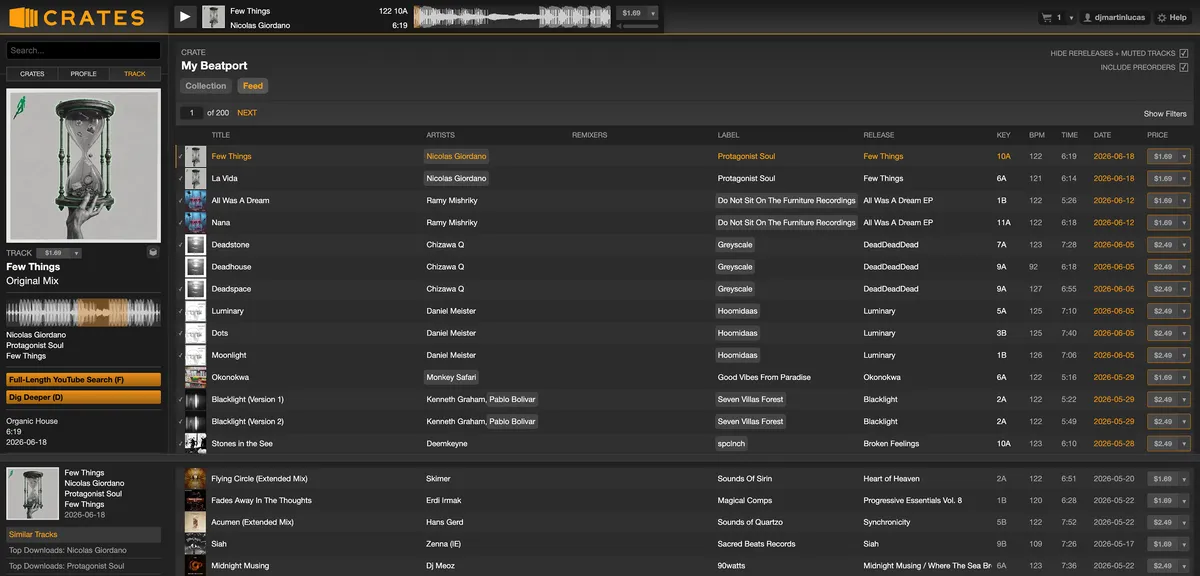
Crates allows you to create multiple “crates” where you can follow and organise different artists and labels. I have separate crates set up for the different styles of music I play — deep house, dub techno, ambient, breaks and drum & bass. Switching between them reduces the flood of new releases I’m browsing at any one time, allowing me to narrow in on a specific sound when I’m looking for tracks for a mix or gig.
Digging By Ecosystem Instead Of Individual Tracks
Discovering tracks via charts and algorithmic playlists always felt like finding one-off records with little wider context. Now I can dig deeper into the back catalogues of artists and labels, organising them into niche crates so I can properly keep on top of their releases.
Not only does this help me uncover historic productions I may have missed, it also means future releases are immediately on my radar. Crates will also show you prereleases, allowing you to look at what’s forthcoming from the labels and artists you follow.
Digging Deeper
One feature that has become a goldmine for discovering music is the “Dig Deeper” function. If you find a track you like the sound of, hit “D” and you’ll be presented with a list of tracks that other DJs also bought.
It allows you to discover artists and labels through real people’s purchasing habits rather than recommendation algorithms. It feels closer to the days of getting an “if you like this, you’ll love this” recommendation from a record store employee — human-centric rather than mathematically algorithmic.
Keyboard Shortcuts
It’s a simple thing, but also something surprisingly difficult to get right: the UI is a joy to use. Browsing and previewing tracks feels incredibly fast and fluid.
Imagine you’re at the top of a list of tracks. Hit [Space] to play the preview. Not feeling it? Hit the [Down Arrow] key and move to the next track. Interest? Hit the [Right Arrow] key to scrub further into the preview, holding [Shift] and the [Right Arrow] scrubs quicker still.
Like the track? Hit your [Return] key to add it to your cart, or instead use the cart dropdown and add the track to a holding cart — yes, you can have multiple carts. I use a second one as a hold bin or wish list so I can revisit tracks later with fresh ears. If I really like something, I’ll follow the artist and add them to one of my crates. If I love it, I’ll hit [D] and see what other DJs also bought alongside it.
Want to hear the full track rather than the short preview? Hit [F] and Crates pulls up the full version of the track on YouTube.
Using Crates reduces friction and unnecessary clicking, which ultimately leads to more digging, more rabbit holes, and better discoveries.
Building A Deeper Library Instead Of A Bigger One
Crates encourages fewer impulse purchases driven by promoted releases and charts, and instead helps you build a stronger identity within your library by focusing on the artists, labels and sounds that genuinely matter to you.
Artists and labels become recognisable building blocks within your collection rather than disposable one-off purchases. Over time, you begin learning their sounds, what they do and don’t release, how frequently they put music out, and how their productions sit alongside the rest of your library.
Because of this, following and supporting artists and labels starts to feel far more intentional.
Final Thoughts
Beatport remains one of the biggest storefronts for house and techno, and Crates doesn’t try to replace it. Instead, it leverages the data already there and allows DJs to focus on what matters most: digging for new music.
It makes digital digging feel closer to record store digging again.
Try it here; crates.co